Most developers never think about their coding and programming fonts. They open VS Code for the first time, never touch the default settings, and go on to write millions of lines of code in whatever font happened to ship with the editor. That’s a shame, honestly, because the best coding fonts in 2026 — JetBrains Mono, Fira Code, Cascadia Code, and Geist Mono among them — solve real problems that default fonts don’t. They make zero, and O looks different.
They keep your code lined up properly. Some of them even merge symbols like “!=” into a single connected glyph, so your eyes don’t have to parse two characters when one visual shape would do.
- The best coding fonts in 2026 are JetBrains Mono, Fira Code, Cascadia Code, and Geist Mono
- A good coding font needs monospacing, clear character distinction, and often ligatures
- Ligatures merge symbols like != or => into one glyph without changing your actual code
- JetBrains Mono is the most well-rounded free option; Fira Code is one of the best-known coding fonts for its extensive collection of programming ligatures.
- Most developers use a font size between 12 and 16 pixels, and testing in your own editor is the only real way to know what works
Why Should You Even Care What Font You Code In?
Here’s the thing nobody tells junior developers. If you spend several hours a day writing or reviewing code, the font you use can have a meaningful impact on comfort and readability over time. The cumulative effect of squinting at ambiguous characters or misreading a variable name because the font made “rn” look like “m” adds up. Not dramatically, not in any single moment you’d notice, but over a career, it’s real. A font built specifically for code isn’t solving an aesthetic problem. It’s solving a legibility problem that regular text fonts were never designed to handle.

Also Read: How to Set Up Google Alerts
What Actually Makes a Font Work for Coding?
Three things are separating genuinely good programmer fonts from one that just happens to be monospaced.
Equal character width is the baseline requirement. Every letter, whether it’s a skinny “i” or a wide “m”, takes up the same horizontal space. This is what lets your indentation stay visually consistent and your columns of code line up the way you expect them to.
Regular fonts don’t do this — they’re proportional, meaning width changes letter to letter, which is fine for a Word document and useless for code. Character distinction is where a lot of fonts quietly fail. Zero and capital O. The number one, lowercase L, and capital I. In a badly chosen font, these can look nearly identical, and in code, that ambiguity isn’t just annoying; it’s a genuine source of bugs.
Good coding fonts solve this with small design details — a dot or slash through the zero, a tiny tail on the lowercase L. Ligatures are the most debated feature. These visually merge multi-character symbols, like turning “=>” into a single arrow shape instead of two separate characters. Your actual code doesn’t change. Only the on-screen rendering does. Some developers love this. Others find it distracting. We’ll get into that.
The Fonts Actually Worth Trying
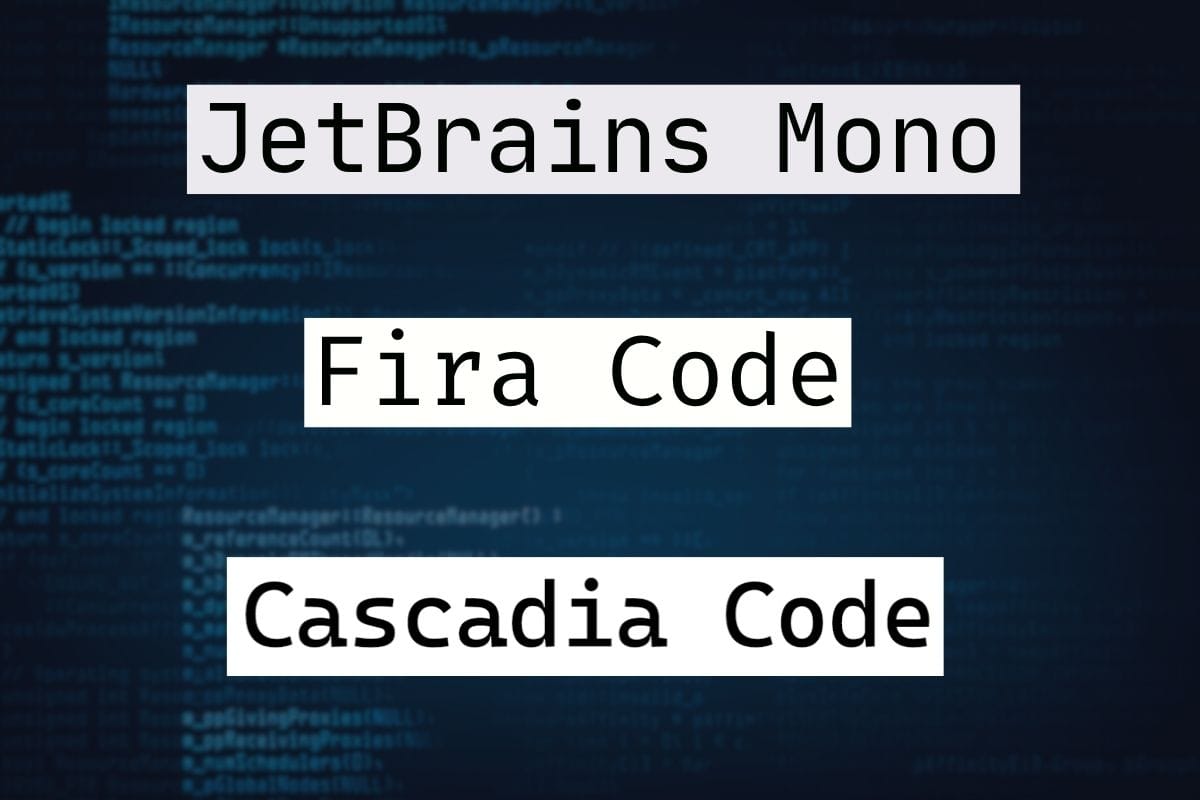
JetBrains Mono comes from the company that builds IntelliJ and PyCharm, so it was designed by people who genuinely use this stuff all day. It has a taller letter height than most programming fonts, which keeps things readable even at smaller sizes, and it comes with a solid ligature set built in. It’s free, and it’s become something close to a default recommendation across the developer community.
Fira Code is the font most people think of first when ligatures come up. It builds on an existing font called Fira Mono and adds an extensive collection of programming ligatures, including arrows, comparison operators, and equality symbols. – arrows, comparison operators, equality checks, all of it. If the idea of symbols visually combining appeals to you, this is the obvious starting point.
There’s also a version without ligatures if you decide you don’t like them after all. Cascadia Code comes from Microsoft and ships as the default in Windows Terminal. If you spend time bouncing between an IDE and a terminal window, this one keeps the visual experience consistent across both, which matters more than it sounds like it should once you’ve lived with mismatched fonts for a while. Geist Mono is the newest name on this list and has been gaining traction fast, particularly among front-end developers who care about design as much as function.
It’s slightly more compact than JetBrains Mono, has a sharper, more contemporary look, and includes a strong ligature set of its own. Source Code Pro, from Adobe, takes the opposite approach to all of the above. No personality, no flourishes, just clean and neutral. Some developers genuinely prefer that. It comes in several weights, which is handy if you want to differentiate comments from active code visually.
Also Read: How to Block Websites on Chrome
Quick Comparison
| Font | Ligatures | Best For | Price |
| JetBrains Mono | Yes | All-around daily use | Free |
| Fira Code | Yes, the most extensive | Ligature lovers | Free |
| Cascadia Code | Optional | Terminal and IDE consistency | Free |
| Geist Mono | Yes | Front-end devs, modern look | Free |
| Source Code Pro | No | Clean, distraction-free code | Free |
How to use Fira Code in VS Code
- Install the Fira Code font on your computer.
- Open VS Code Settings.
- Search for Font Family and enter Fira Code.
- Enable Editor: Font Ligatures if you want ligatures.
- Restart VS Code if the font does not appear immediately.
The official Fira Code documentation provides instructions for enabling the font and ligatures in VS Code.
Should You Actually Turn Ligatures On?
Honestly, there’s no correct answer to this one. It really just depends on when you learned to code and how your eyes got trained. Developers who’ve been writing code since before ligatures were a thing tend to find them weirdly distracting at first, almost like someone rearranged furniture in a room they’ve walked through blindfolded for years.
Whether ligatures improve readability is largely a matter of personal preference. Some developers find that combined symbols make complex operators easier to scan, while others prefer seeing every individual character. The best approach is to test both settings in your usual editor and decide which feels more comfortable for your workflow. The honest advice is to just try it. Turn ligatures on for a few weeks. If your eyes adjust and you like it, keep it. If it bugs you the whole time, turn it off. Nobody’s coding career has ever been derailed by this decision either way.
What Size Should Your Coding Font Actually Be?
This depends a lot on your screen and how close you sit to it, but most people end up somewhere in the 12 to 16 pixel range. Higher resolution monitors usually mean you can go a bit smaller without losing any clarity. There’s a quick way to check whether your current size actually works. Read code at your usual size for about thirty minutes. If you’re not leaning toward the screen, not squinting, not rereading the same line twice because something looked off, that size works for you. If any of that’s happening, go a notch bigger and see how that feels instead.
So, Which Coding Font Should You Actually Pick?
JetBrains Mono is the one to grab if you don’t want to spend an afternoon comparing fonts. It’s reliable, it’s free, and it works well in basically every setup. Fira Code is where you end up if ligatures are non-negotiable for you — it’s still the font everyone else gets measured against on that front. Cascadia Code makes sense if your day involves jumping between a terminal and an editor regularly, since it keeps the look the same in both places. And Geist Mono is the pick if you want something that feels a little newer and more design-forward without giving up readability.
Sources and References
- FontFYI – Best Monospace Coding Fonts Developer’s Guide 2026
- MadeGoodDesigns – Best Programming Fonts 2026
- MadeGoodDesigns – 25+ Best Coding Fonts of 2026
- Ordoh – 15 Best Coding Fonts 2026
- Prime Technologies Global – Best Coding Fonts
- Impex Infotech – Best Code Fonts for Developers 2026