Quick Answer: Google Smart Lock used to store your Netflix login inside your Google Account and fill it in automatically across Android phones, tablets, Android TVs, and Chrome. You open the app, and you get a sign-in. Google discontinued half of the password feature in 2022, and Google Password Manager now handles that part.
That auto-sign-in method is what most people mean by “Netflix Google Smart Lock”. It killed one constant annoyance: typing a long password with a TV remote.
- Smart Lock had three unrelated features sharing one brand name.
- Netflix was a launch partner when Google unveiled the platform at I/O 2015.
- Over 30% of returning Netflix Android users were signed in automatically.
- Netflix logged a 20% drop in sign-in support calls from Android members.
- Google deprecated the password version in 2022; Credential Manager replaced it.
Netflix Has Three Totally Different Tools
How-To Geek stated the core problem: Google gave three separate products the same label.
| Version | What it really does | Status |
| Smart Lock for Android | Keeps your phone unlocked in trusted situations | Renamed Extend Unlock on Android 14+ |
| Smart Lock for Passwords | Synced saved logins between Chrome and Android apps | Retired into Google Password Manager |
| Smart Lock for Chromebooks | Unlocks a Chromebook when your phone is nearby | Works over Bluetooth |
The Netflix app was dependent on the middle row.
Also Read – How to Use Google Authenticator Transfer to a New Device
Why Netflix Jumped On Board First
PCMag covered the reveal at Google I/O, where the Identity Platform launched alongside Smart Lock for Passwords. Partners included Netflix, Orbitz, and The New York Times, so members could binge, book, and read without a password prompt. Google described it plainly: Smart Lock is a password manager built into your Google account.

The pain point was money. Google’s Netflix case study notes that forgotten usernames and passwords ranked among the streamer’s biggest call drivers.
Netflix’s Rob Caruso, Director of Partner Engagement, put it this way: “Wherever possible, we want to reduce friction in getting our members authenticated across devices. Smart Lock can help, particularly on big screens, where entering user credentials is more cumbersome than on mobile or PC.
The Numbers Netflix Actually Reported
Netflix shipped it in days. The published results:
- 30%+ of returning Netflix users signed in to the Android app via Smart Lock.
- 60%+ of eligible, prompted users chose to save their password with it.
- 20% reduction in contact volume from members who could not sign in on Android.
Caruso summed up the payoff: “We were able to implement Smart Lock in just a few days. It has paid off almost immediately, reducing both sign-in friction and CS call volume. We are excited to be working with Google to add Smart Lock to Android TV and other platforms when available.”
The case study described Netflix as having 70 million-plus members across 190 countries watching 125 million hours daily. It has since passed 300 million paid memberships.
Also Read – How to Block Websites on Chrome Without Getting Bypassed
Goodbye To Remote-Control Typing
Android Police first spotted the Android TV rollout in 2016, and Gadgets 360 detailed how it worked. The TV app pulled the saved credential from a trusted phone nearby and dropped you onto the browse screen. Hyperlink InfoSystem flagged one catch: both the app and the TV software had to be current, since the update shipped in phases.
How the Netflix Google Smart Lock Sign-In Worked, Step-by-Step
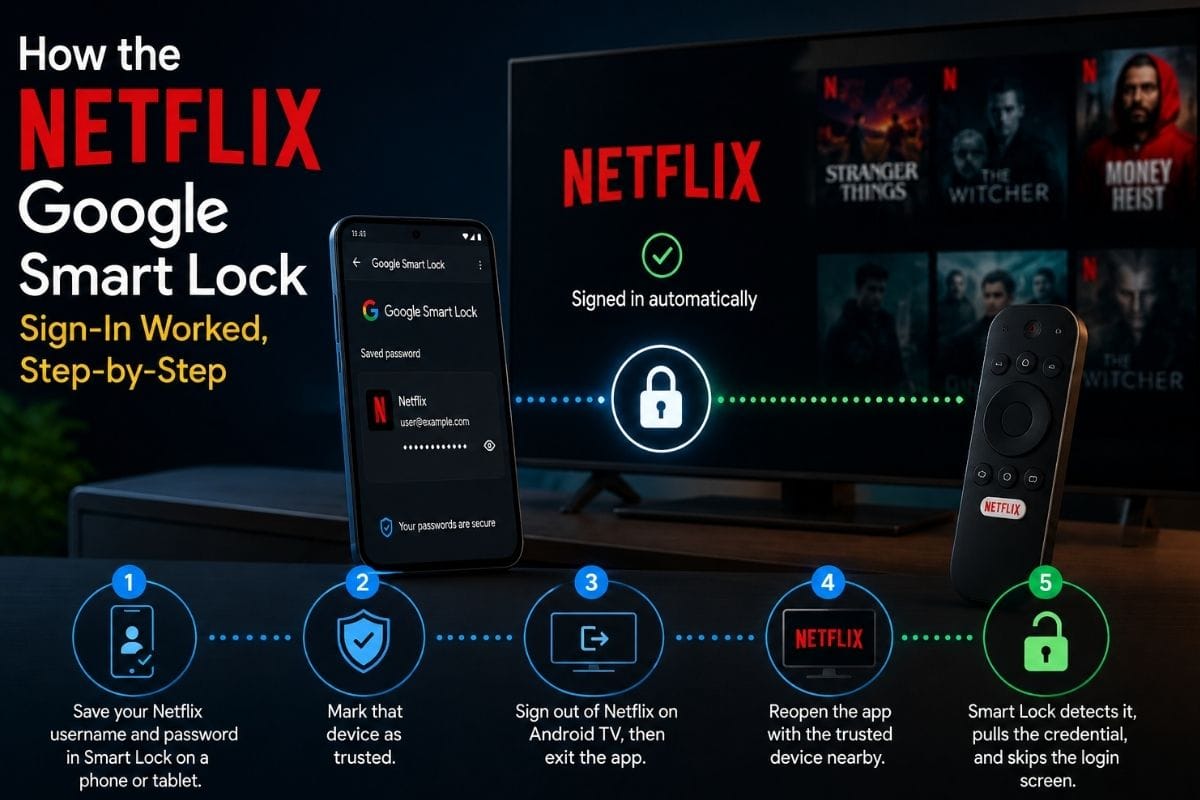
- Save your Netflix username and password in Smart Lock on a phone or tablet.
- Mark that device as trusted.
- Sign out of Netflix on Android TV, then exit the app.
- Reopen the app with the trusted device nearby.
- Smart Lock detects it, pulls the credential, and skips the login screen.
What Changed: The 2022 Shutdown
Google deprecated Smart Lock for Passwords in 2022 and later stripped it from the Play Services Auth SDK. Apps built on version 21.0.0 or newer cannot call the old API.
Developer documentation from Google now points everyone to Credential Manager, one API covering passwords, passkeys, and federated sign-in like Sign in with Google. Android 14 added third-party password manager support. Apps already live in the Play Store kept working, so users saw no break.
Your saved Netflix password still auto-fills. It just travels through Google Password Manager.
Also Read – The Best Coding Fonts For Programmers Nobody Talks About
Smart Lock on Your Phone Today
Android Authority’s guide shows the way: Settings > Security & privacy > More security & privacy > Smart Lock. Newer handsets read Extend Unlock. Enter your PIN, then pick a mode:
- On-body detection — stays unlocked while the phone senses it is being carried.
- Trusted places — no lock screen at a location you define, like home.
- Trusted devices — stay unlocked while paired with a selected Bluetooth device.
Voice Match and Trusted Face were the weakest links and are being phased out.
On a Chromebook, open Settings > Connected devices, add your Android phone, then toggle Smart Lock on. It handshakes over Bluetooth, so it can feel slower than typing a PIN.
The Security Trade-Off Worth Knowing

Convenience costs something. On-body detection cannot tell whose body is carrying the phone. Leave a walkie-talkie handset on your desk during a coffee run and anyone can pick it up unlocked. Trusted places depend on location accuracy, which drifts.
Also Read – How to Set Up Google Alerts and Stop Chasing Updates Online
FAQs
Is Google Smart Lock still available in 2026?
Ans: Partly. Device unlocking survives as Extend Unlock on Android and Smart Lock on Chromebooks. The password-syncing version was retired.
Does Netflix still support Smart Lock sign-in?
Ans: Auto sign-in still works on Android, but it now runs through Google Password Manager and Credential Manager, not the old Smart Lock API.
Why does Netflix log me in without asking for a password?
Ans: Your login is saved to your Google Account and filled in automatically when you open the app.
How do I stop automatic Netflix sign-in?
Ans: Open Google Password Manager, find the Netflix entry, and delete it. You can also switch off auto sign-in in Google Account settings.
Where is Smart Lock in my phone settings?
Ans: Go to Settings > Security & privacy > More security & privacy, then tap Smart Lock or Extend Unlock.
Is Smart Lock safe to use?
Ans: It is reasonably safe when set up carefully. The risk is that anyone holding your phone in a trusted state can open it.
Sources & References:
- PC MAG – Identity Platform launched alongside Smart Lock for Passwords.
- Gadgets 360 – The TV app used the saved credentials from a trusted phone nearby and dropped you onto the browse screen.
- Hyperlink InfoSystem – Both the app and the TV software had to be current since the update shipped in phases.
- How-To Geek – The core problem was that Google gave three separate products the same label.